Job search organization guide
Free Job Application Tracker for Excel
Download a simple, editable spreadsheet to organize your job search. Record each application, choose a status, and give every active opportunity a next action and date. No email or account required.
Free .xlsx file. No email or account required. Update it yourself in Excel or compatible spreadsheet software.
Updated
Start with one simple sheet
Your applications, next actions, and follow-ups in one place.
Keep the employer, role, posting link, date applied, status, next action, follow-up date, and notes together. The file includes status dropdowns, filterable columns, and three clearly marked fictional examples you can replace. Add more table rows as your search grows.
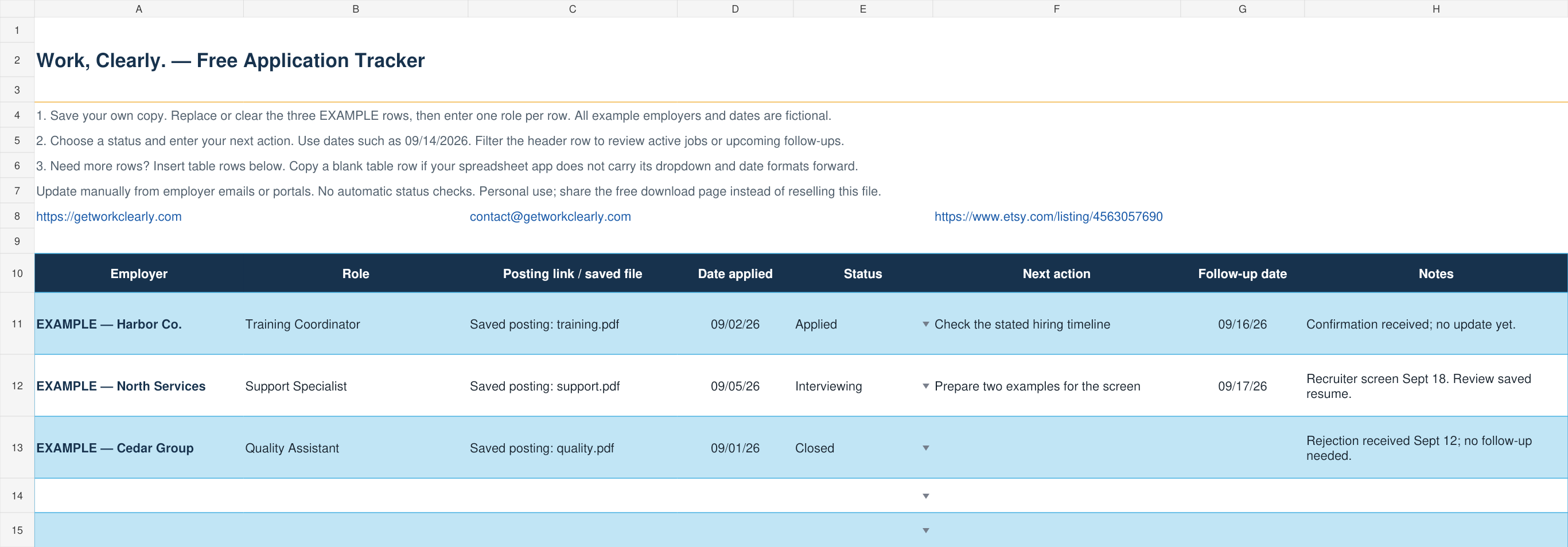
Free application tracker
One editable sheet with the essentials. Save a copy, replace the examples, and start tracking. No application-count paywall, macros, or employer-portal connection.
Get the free trackerComplete Get Hired Bundle
The full Excel tracker plus workbooks for resume accomplishments, interviews, career changes, and identifying your skills. Choose it when you want help preparing your applications as well as organizing them.
See the paid bundle and included files on EtsyWant occasional career tips? Join the optional email list. Your free download is available either way.
01
Save the posting when you apply
Job postings can be edited or removed without notice. Save the title, employer, location, link, date applied, salary range, and the complete description. Keep a copy of the resume and cover letter version you submitted.
This record becomes essential when an employer calls weeks later. You can quickly review the role, the evidence you emphasized, and the questions you want to ask.
- Employer and exact position title
- Posting URL and saved description
- Application date and current status
- Resume or cover letter version
- Contact names and communication history
- Next action and follow-up date
02
Set up a tracker you can maintain
A spreadsheet is a practical starting point if you want to sort opportunities, filter active applications, and keep dates together. A notebook can also work for a small search. The best method for you is the one you will update after an application or response.
Start with the fields below. Use one row for each role, even when two roles share an employer. Keep lengthy job descriptions and application documents in a separate folder and record their filenames or links.
| Field | What to record |
|---|---|
| Employer and role | Exact company, job title, and requisition ID if provided. |
| Posting and documents | Posting link, saved description, and the resume version submitted. |
| Date applied | Actual submission date; leave blank until you submit. |
| My stage | Your consistent label, such as Applied or Interviewing. |
| Employer update | Exact portal wording or recruiter message and the date checked. |
| Next action and date | One concrete task and when you plan to do it. |
| Contact and notes | Recruiter details, promised timelines, and relevant communication. |
03
Track the next action, not just the status
A status such as “applied” describes the past. A next-action field tells you what to do. Examples include follow up Friday, prepare three interview stories, send thank-you note, or close the application.
Give every active opportunity a next action and date. This turns the tracker from an archive into a working job-search system.
Before: Status: Interviewed.
Clearer: Status: First interview completed. Next action: Send thank-you email today and prepare examples about training and conflict resolution before Friday.
The second record keeps momentum and reduces mental clutter.04
Use consistent status labels
Choose a small set of statuses such as interested, preparing, applied, screening, interviewing, offer, closed, and withdrawn. Consistency makes it easier to see the health of your search.
Do not leave rejected or expired applications in the active queue. Closing them is not failure; it keeps your attention on opportunities where action is still possible.
05
Walk through three sample applications
These fictional entries illustrate the method, not the exact layout of the paid Excel workbook. Dates and actions are examples; employer instructions take priority.
- After applying: save the confirmation and record the submission date.
- After a response: record what the employer actually said, then update your stage.
- Before an interview: review the exact posting and resume you submitted.
- When the opportunity ends: close it and clear any obsolete next action.
| Opportunity | Current record | Next action |
|---|---|---|
| Harbor Example Co. — Training Coordinator | Applied Sept 2. Confirmation email received. No other update. | Sept 16: check the stated hiring timeline; send one polite inquiry if appropriate. |
| North Example Services — Support Specialist | Recruiter screen scheduled for Sept 18. | Sept 17: review the saved posting and prepare two relevant examples. |
| Cedar Example Group — Quality Assistant | Rejection received Sept 12. | Mark Closed; retain the record and stop scheduled follow-ups. |
06
Checking application status is a separate task
If you want to know whether an employer has reviewed your application, open the candidate portal linked in your confirmation email or the employer’s official careers website. Sign in to the same account you used to apply. Check the confirmation email for instructions and a requisition number if you cannot find the role.
A personal spreadsheet cannot reveal an employer’s internal hiring decisions. Our Excel tracker does not connect to employer portals, check applications automatically, or display live recruiter updates. Enter updates yourself after checking a portal or receiving a message.
Labels such as “submitted,” “under review,” and “in progress” vary by employer. Record the wording and date without assuming it promises an interview. If there is no update, follow the employer’s contact instructions and timeline. When no timeline is given, a single polite inquiry after roughly one to two weeks may be reasonable; wait longer if the posting specifies a later closing date.
In that inquiry, identify the role, requisition number, and date you applied, reaffirm your interest, and ask whether a timeline is available. Respect a no-contact instruction. Record your inquiry and continue pursuing other opportunities while you wait.
07
Review the tracker once a week
Count applications, responses, interviews, and offers, but do not chase volume alone. Look for patterns. If targeted applications produce interviews and rushed applications do not, adjust your effort accordingly.
Review stalled opportunities, upcoming interviews, overdue follow-ups, and the sources producing the best matches. The goal is a calmer, more deliberate search—not a spreadsheet that creates more work.
- Check upcoming interviews and any employer-promised response dates.
- Complete or reschedule overdue actions instead of leaving them ambiguous.
- Archive closed opportunities and keep your saved documents organized.
- Look for patterns over time; a handful of applications is too little evidence to judge your whole approach.
08
Choose the free tracker or the complete bundle
Use the free Excel tracker at the top of this page, or build your own sheet from the column list. The free file has one editable worksheet, status dropdowns, filterable columns, and fictional examples to replace. Insert more table rows whenever you need them; copy an existing blank row if your spreadsheet app does not extend its dropdown and date formats automatically.
If you prefer a prepared workbook, the Complete Get Hired Bundle includes an Excel Job Application Tracker alongside the resume, interview, career-change, and skills tools. The tracker requires Excel or compatible spreadsheet software. Check the Etsy listing for the included files before buying.
This is a digital download for you to maintain. It does not apply for jobs, contact employers, or guarantee interviews.
Common questions
Frequently asked questions
Is the free application tracker really free?
Yes. Download the one-sheet Excel file directly, with no email signup or account. Use it for your own job search and add table rows as needed. The Complete Get Hired Bundle is a separate paid product.
What software do I need for the free tracker?
The file is an .xlsx workbook designed for Microsoft Excel. Compatible spreadsheet apps may also open it, but dropdowns and formatting can vary. It contains no macros.
Can this tracker check my application status automatically?
No. It is a personal spreadsheet you update manually. Check the employer’s official candidate portal or recruiter messages for hiring-status updates, then record them in your tracker.
Does under review mean I will get an interview?
No. Employers use status labels differently. Record the exact wording and date, and wait for an explicit invitation or message rather than treating a portal label as a promise.
How soon should I follow up after applying?
Follow the employer’s instructions first. When no timeline is provided, a polite follow-up after roughly one to two weeks may be reasonable, depending on the role and closing date.
Should I track jobs I have not applied for yet?
Yes. Use an interested or preparing status and assign a deadline so promising postings do not disappear in a collection of browser tabs.
What format should I use?
Use the simplest format you will maintain consistently. A spreadsheet works well because it supports sorting, filtering, status fields, dates, and notes in one place.